Kubernetes orphaned resource monitoring
Orphaned resources are Kubernetes (K8s) objects that remain in a cluster but are no longer used by any active pod. Left unchecked, these objects accumulate over time, adding clutter and unnecessary risk to your cluster.
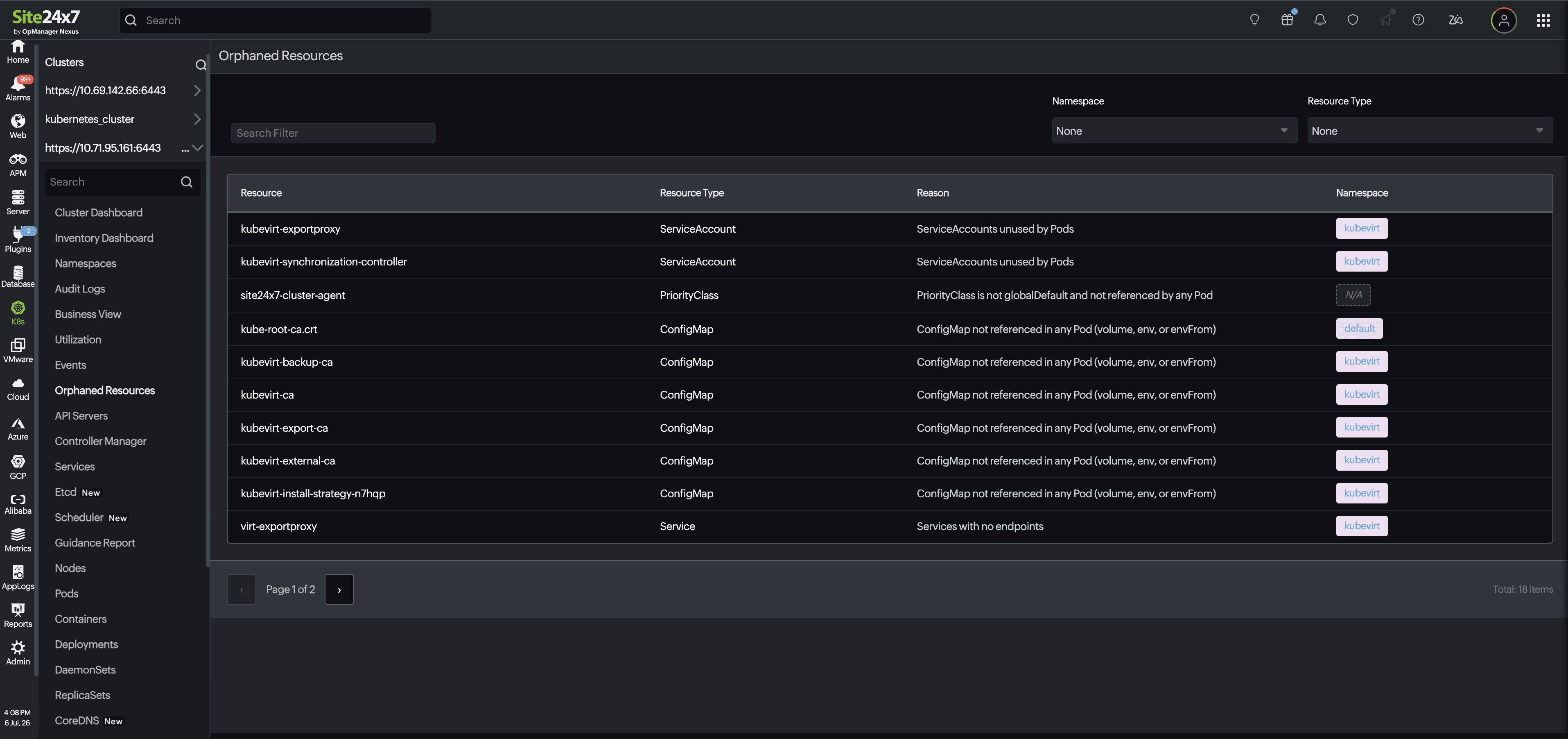
The Kubernetes orphaned resources monitor identifies these unused objects across your Kubernetes clusters and surfaces them on a single Orphaned Resources page, so you can review and clean the resources unfazed.
Use cases
Security and compliance hardening
Stale service accounts and lingering RBAC bindings broaden your attack surface. If an old service account retains broad cluster roles (for example, read secrets or execution privileges), an attacker who gains access to that token can exploit unmonitored access paths. Continuously flagging non-referenced service accounts keeps audit trails clean.
etcd performance and cost optimization
While a few unused ConfigMaps have minimal impact, thousands of orphaned objects bloat the etcd key-value store. This increases memory consumption on control plane nodes, slows down API server LIST/WATCH calls, and inflates cluster backup sizes. Furthermore, unattached persistent volumes (PVs) directly incur ongoing cloud storage charges.
Namespace life cycle in multi-tenant environments
In multi-tenant or ephemeral feature-branch environments, tear-downs don’t always run cleanly. Filtering orphaned resources by namespace gives tenant teams clear visibility to prune their own stale configurations before removing whole namespaces.
Best practice: Combine automated detection with GitOps practices (for example, Argo CD or Flux with pruning enabled) or tools like kube-janitor or k8s-cleaner to enforce declarative cleanup rules automatically in non-production environments.
Benefits of Kubernetes orphaned resource monitoring
- Automatic detection: Continuously scans your cluster for resources no longer referenced by any pod, all without manual auditing.
- Broad resource type coverage: Flags service accounts, priority classes, ConfigMaps, and services that meet defined orphan conditions.
- Reason-based context: Pairs every finding with the exact reason it was flagged so you know why a resource was listed.
- Centralized view: Review orphaned resources across your entire cluster from a single page within the K8s module.
Prerequisites
- Install the Kubernetes agent version 22.3.00 or above on your Kubernetes cluster.
- For existing customers, upgrade your Kubernetes agent to version 22.3.00 or above.
View Kubernetes orphaned resources
To view orphaned resources in a Kubernetes cluster:
- Log in to your Site24x7 account.
- Navigate to K8s. Then, select the cluster name.
- Click Orphaned Resources.
- Use the Namespace and Resource Type filters to narrow the list to a specific namespace or object type.
Monitored resource types
Site24x7 checks for the resource types and flags unused resources in the following metrics:
| Metric name | Description |
|---|---|
| Resource | Displays the name of the Kubernetes resource that has been identified as orphaned. |
| Resource Type | Displays the type of Kubernetes resource, such as ConfigMap, Service, ServiceAccount, PriorityClass, Secret, or other supported Kubernetes objects. This helps identify the kind of resource that has been flagged. |
| Reason | Explains why the resource is considered orphaned. For example, a Service might not have any endpoints, a ConfigMap might not be referenced by any pod, or a ServiceAccount might not be used by any running pod. |
| Namespace | The Kubernetes namespace in which the orphaned resource resides. Cluster-scoped resources that aren’t associated with a namespace are displayed as N/A. |